
Snapchat’s DIY Fitting Room: The Hack That Ends Return Guilt
You are staring at a $120 linen blazer on your screen. The model looks effortless, sun-drenched, and somehow taller than physics should allow. You want it, but you know the drill: you buy it, it arrives, it fits like a potato sack, and then it sits in a return bag by your front door for three weeks. This cycle is exhausting.
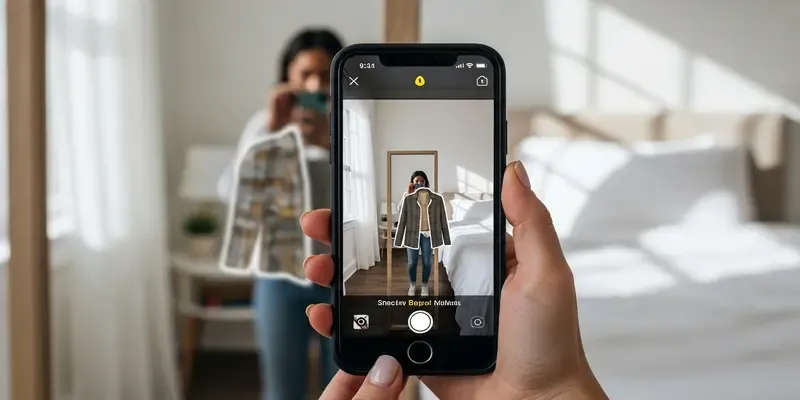
Enter the DIY virtual fitting room. Forget the high-tech, clunky AR tools being pushed by big retailers. The most effective way to visualize your next purchase is already in your pocket. By repurposing Snapchat’s sticker creation tool, you can stop guessing and start seeing how that specific shade of ‘burnt orange’ actually plays with your skin tone.
Why Retail AR is Failing (And Why You Shouldn’t Care)
Most big-brand ‘virtual try-on’ tools are gimmicks. They require high-speed internet, perfectly calibrated lighting, and a lot of patience. They feel corporate and sterile.
The Snapchat sticker hack is different because it’s gritty and realistic. You are using your actual photos, in your actual room, with your actual lighting.
- It’s Instant: No waiting for a third-party app to render a 3D model.
- It’s Contextual: You can ‘wear’ the new item over clothes you already own.
- It’s Honest: Snapchat’s cutout tool isn’t trying to sell you something; it’s just showing you a composite image.
The Three-Step Workflow to Shopping Sanity
To master the Snapchat’s sticker creation tool for shopping, you need a process. Don’t just slap images together; be surgical about it.
- The Base Layer: Take a photo of yourself in a neutral ‘base’ outfit—like leggings and a tank top—in front of a full-length mirror. This is your mannequin.
- The Extraction: Screenshot the item you want from an online store. Open Snapchat, go to ‘Create Sticker’ (the scissors icon), and trace the item.
- The Overlay: Open your mirror selfie in Snapchat, tap the sticker icon, and drop your new ‘clothing’ on top. Scale it. Rotate it. See if the silhouette actually works for your frame.
The Day I Saved $400 on a ‘Statement’ Coat
I remember sitting in my cramped home office, the smell of burnt coffee lingering in the air, hovering over the ‘Add to Cart’ button for a heavy, oversized wool coat. It was beautiful, but I’m five-foot-four on a good day. In the past, I would have gambled.
Instead, I screenshotted the coat and turned it into a Snapchat sticker. I layered it over a photo of me wearing my favorite boots. Immediately, the illusion shattered. On the screen, the coat swallowed my legs whole; I looked like a kid playing dress-up in a giant’s closet. I felt a wave of relief rather than FOMO. I didn’t just save money; I saved myself the soul-crushing chore of a UPS drop-off.
Toward a More Conscious Closet
We need to talk about ‘Return Culture.’ It’s a logistical nightmare and an environmental disaster. Shipping items back and forth because we ‘couldn’t tell the vibe’ is a habit we need to break.
Using this hack isn’t just about being thrifty; it’s about being intentional. When you visualize a garment in your space, on your body, you develop a relationship with the item before it even ships. You stop buying ‘ideas’ of clothes and start buying clothes that actually function in your life.
FAQs
Q: Does this work for shoes? Yes! In fact, it’s one of the best ways to see if a sneaker colorway clashes with your favorite denim wash.
Q: How do I get a clean sticker cut? Try to find product photos with a white or solid background. The Snapchat AI tool struggles with busy lifestyles or cluttered ‘lifestyle’ shots.
Q: Can I save these ‘outfits’ for later? Absolutely. Once you’ve created the composite, save the snap to your Memories or Camera Roll. It creates a digital lookbook of items you’re considering.
Q: Is there a way to do this for accessories? Yes. It works brilliantly for hats, glasses, and even jewelry. Just make sure your base photo is a close-up of your face or neck.
Q: What if the lighting in the product photo is different? You can use Snapchat’s built-in filters or ‘Edit’ tools to slightly tweak the brightness of your base photo to match the sticker for a more realistic look.
Q: Is this hack better than Instagram’s sticker tool? In my experience, Snapchat’s scissor tool is more precise for manual tracing, giving you a cleaner ‘cut’ of the clothing item than Instagram’s automated ‘Cutout’ feature.


